
Download Free RAR Extractor – Free File Compression Tool for Windows, Mac, Android & iOS
Free RAR Extractor is a powerful yet lightweight file compression tool designed to simplify the process of extracting RAR and ZIP archives. Developed by Media Freeware, this free software provides a straightforward solution for users who frequently deal with compressed files. Whether you're a student, professional, or casual user, Free RAR Extractor ensures that you can access your files quickly and securely without the need for complex setups or paid subscriptions. With a clean interface and minimal system requirements, it's an ideal choice for anyone seeking a reliable way to open and extract compressed files across multiple platforms.
Effortless RAR & ZIP File Extraction Made Simple
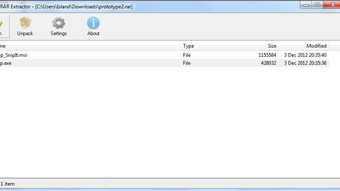
One of the standout features of Free RAR Extractor is its ability to handle RAR and ZIP archives with remarkable ease. Unlike many other tools that require extensive configuration or third-party dependencies, this software operates independently and delivers results instantly. Simply drag and drop your RAR or ZIP file into the application window, and within seconds, the extraction process begins. The interface is intuitive, making it accessible even for users with minimal technical experience. There’s no need to navigate through complex menus or memorize command-line codes—everything is designed for simplicity.
Another major advantage is the software’s speed. Free RAR Extractor uses optimized algorithms to decompress files quickly, minimizing wait times, especially with large archives. Users have reported that files that took minutes to extract using other tools were processed in under half the time with this app. It also supports batch extraction, allowing you to select multiple RAR or ZIP files at once and extract them all simultaneously—perfect for managing large collections of compressed data from downloads or backups.
Security is also a top priority. The tool doesn’t require internet access during extraction, ensuring your data remains private and protected. It doesn’t collect personal information or display intrusive ads, which enhances the overall user experience. For those who value privacy and efficiency, Free RAR Extractor delivers a trustworthy, no-frills solution that works exactly as promised—every time.
Compatible Across Devices: Windows, Mac, Android & iOS
Free RAR Extractor isn’t limited to just one platform—it’s available for Windows, Mac, Android, and iOS, making it one of the most versatile file extraction tools on the market. Whether you're working on a desktop, laptop, tablet, or smartphone, you can seamlessly extract RAR and ZIP files without switching devices or relying on cloud-based tools.
On Windows, the software installs with minimal steps and runs smoothly on Windows 7 through Windows 11. The installer is compact, typically under 10 MB, and doesn’t clutter your system with unnecessary components. Once installed, it integrates smoothly with the right-click context menu, allowing you to extract files directly from File Explorer with a single click.
For Mac users, the app is available as a .dmg file that installs in seconds. The macOS version maintains the same sleek, user-friendly design and supports all major RAR and ZIP formats. It’s particularly useful for creatives and developers who frequently receive compressed project files from clients or collaborators.
Mobile users aren’t left behind either. The Android and iOS versions are optimized for touchscreens, offering a responsive interface that makes file management on the go effortless. You can extract files directly from your downloads folder, email attachments, or cloud storage apps like Google Drive and iCloud. This cross-platform availability ensures that your compressed files are always accessible, no matter where you are.
Key Features, Pros & Cons at a Glance
- Extract RAR and ZIP files instantly – No need for third-party tools or complex setups.
- Batch extraction support – Process multiple archives at once for maximum efficiency.
- Lightweight and fast – Minimal RAM and CPU usage, ideal for older devices.
- Secure and private – No data collection, no ads, no internet dependency.
- Intuitive drag-and-drop interface – Simple and beginner-friendly.
- Available on Windows, Mac, Android, and iOS – Full cross-platform compatibility.
- Completely free to download and use – No hidden costs or trial limitations.
Pros
- Free and ad-free experience
- Lightweight and fast performance
- Supports both RAR and ZIP formats
- Easy to use for beginners
- Available on all major platforms
- Secure extraction without internet access
Cons
- No built-in compression feature (only extraction)
- Limited customization options
- No support for encrypted RAR files with passwords
- Interface is minimal, which may feel too basic for advanced users
Frequently Asked Questions (FAQ)
Final Verdict: A Must-Have Free Tool for File Extraction
If you're looking for a reliable, secure, and fast way to extract RAR and ZIP files without spending a dime, Free RAR Extractor is an excellent choice. Its lightweight design, cross-platform availability, and user-friendly interface make it a standout option among free file compression tools. While it doesn’t offer compression features or support for encrypted archives, its core functionality is executed flawlessly.
Whether you're downloading software, accessing project files, or organizing personal documents, this tool streamlines the entire process. It’s perfect for students, remote workers, and anyone who deals with compressed files regularly. With regular updates to maintain compatibility and performance, Free RAR Extractor continues to evolve as a dependable utility.
Ready to simplify your file management? Download Free RAR Extractor today and enjoy a seamless, secure, and completely free extraction experience across all your devices.







